
SPARK MEP COMPANY LTD.
INTEGRATED POWER. ENGINEERED PRECISION
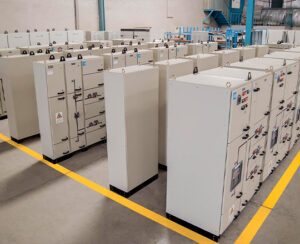
SPARK is a leading Saudi-based contracting company
specializing in integrated MEP solutions, advanced testing &
commissioning, and high-performance power systems.
With a team of skilled engineers and certified technicians, we
deliver turnkey services that power critical infrastructure, optimize
energy efficiency, and ensure system reliability.
From design and installation to performance validation, SPARK
combines innovation, technical excellence, and local expertise to
bring your projects to life — safely, on time, and beyond
expectations.





WANT MORE INFO?
CREATE YOUR DREAM WEBSITE
Alante Pro is perfect for any type of website. The modern design makes it great for blogs to businesses and everything in between!

POWER + BEAUTY
Built with beauty in mind, this theme has it all. Stunning beauty designed to leave your visitors amazing, and built to give you total control! With hundreds of options you can make changes in seconds. Whether you're new to WordPress or a seasoned developer, Alante Pro has everything you need!
So flexible it might just be the last theme you'll ever need! Quickly change the footer copyright, add unlimited sliders, unlimited colors, 600+ Google fonts... and so much more!
POWER + BEAUTY
Built with beauty in mind, this theme has it all. Stunning beauty designed to leave your visitors amazing, and built to give you total control! With hundreds of options you can make changes in seconds. Whether you're new to WordPress or a seasoned developer, Alante Pro has everything you need!
So flexible it might just be the last theme you'll ever need! Quickly change the footer copyright, add unlimited sliders, unlimited colors, 600+ Google fonts... and so much more!

150+ SHORTCODES

UNLIMITED COLORS
600+ GOOGLE FONTS
UNLIMITED SLIDERS


Our Clients